

Summary:
AtoInvoice.com (also called AutoInvoice) is a cloud-based SaaS invoicing system designed specifically for freelancers, sole traders and small business owners who want to create, send, and track professional invoices without the fuss of fully-fledged accounting software. Key features include PDF invoice creation, sending by Gmail and WhatsApp, Stripe invoice links, automatic payment reminders, recurring invoice scheduling, and expense tracking. For Indian freelancers and small businesses struggling to know how to meet GST invoice criteria, this article explains it all what it is designed to do, how to go about using it step-by-step, its boundaries and its ties to India’s current (and coming) e-invoicing system.
Table of Contents
What Is AtoInvoice.com?
Every freelancer or small business owner in India is familiar with the anger and despair: you‘ve done the work, you‘ve delivered the project and then there is the scenario where you have to create, format, bill and chase for a payment invoice; a workflow that can take longer than the actual work, if it‘s a manual one.
AutoInvoice.com is a web-based invoicing automation platform (AutoInvoice) designed to remove that friction. It‘s a SaaS tool built from scratch for independent professionals, sole traders and small business owners that need to send professional invoices but don‘t want the overhead of a full accounting suite.
The gist of the platform is very simple: make a sleek invoice for clients with a few-clicks, send it out by e-mail or WhatsApp through existing apps your client use, get paid trough a built-in Stripe payment link, all without leaving your workflow or learning any new complicated systems.
For Indians in particular, AtoInvoice.com is solving one of the biggest frustrations I hear constantly about the freelance and SME space the disconnect between informal payments and professional documentation. With India’s gig economy growing rapidly, and GST compliance becoming the standard, an easy to use and reliable invoicing tool is what every business will need, not want.
How AtoInvoice.com Works: A Step-by-Step Overview
Using AtoInvoice.com is very easy, there is no special knowledge required for setting up an account or long, complicated onboarding process. The sample workflow below shows how it works from opening an account to receiving funds:
Step 1: Sign up. Sign up at atoinvoice.com with your email address and a little bit of business info. The onboarding for the service is intentionally sparse it‘s what the company‘s ethos of friction-less service was designed to be!
Step 2 Create Your Business Profile. Type in a business name and add a logo, address, GST Identification Number (if applicable), bank details, and contact details. Every invoice you generate will use this information.
Step 3: add your clients Create a basic client database in which you input the client‘s name, name of business, e-mail address, phone number and billing address. When stored, if you invoicing the same client again, you do not need to put in that client‘s info again and again.
Step 4: Create an invoice Choose a client from your own database, enter invoice information describe the service, amount, per-unit rate, tax structure (including the GST where applicable), discounts and the payment due date. All the calculations (per-item and overall) are done automatically so there‘s no need for the accountancy skills.
Step 5:Finish Up Review and submit Check the invoice shown in its final PDF version. When prepared, decide how you want to send it:
- Gmail delivery Gmail is opened with a pre-composed professional message, a explicit subject line, with the invoice PDF attached and your client receives it directly in their inbox.
- WhatsApp scheduling You can choose an appropriate time to send the invoice to WhatsApp; this is especially useful if you mainly contact a client via messaging rather than email.
- Manual download – Save the PDF and send it to whatever method you like.
Step 6. Follow up on the payments status. Keep an eye on invoice statuses Paid, Unpaid, Partly Paid or Over Due. Automatic email reminders for paid invoices are sent to the customers and this takes care of avoiding difficult payments follow up phone calls or letters.
7. Receive payment Each bill can have a built-in Stripe payment link your customers can then pay by card with just a tap. Paid Stripe payments will automatically be marked paid in your system. (No changing the status manually!)
Key Features of AtoInvoice.com
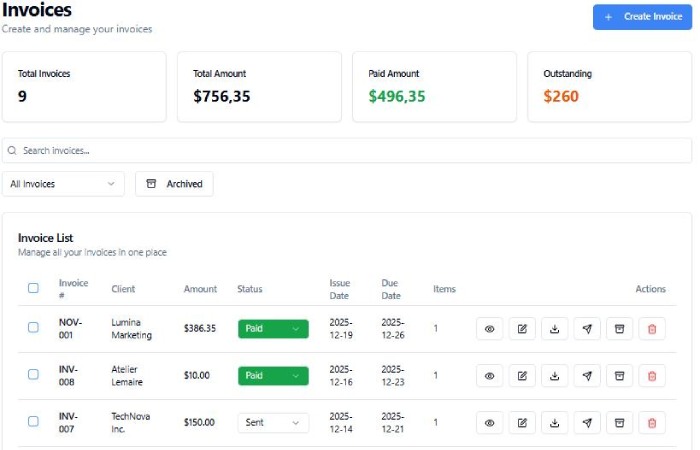
Designed to look professional. Our invoices are generated as unobtrusive professional PDF files, and can be viewed on any device, laptop, tablet or smartphone. Our invoice template is designed to be easy to read – showing what was sent, how much, when it is due and how to pay. They can also be generated with GSTIN, HSN/SAC codes and GST breakdown (where applicable) for Indian companies.
Gmail and WhatsApp Invoice Deliveryt Instead of asking clients to log-in to a client portal or look for a payment link on an unfamiliar system AtoInvoice.com simply sends invoices through the channels your clients already use every day. India alone has more than 500 million Whatsapp users who regularly communicate through the application, certainly no stranger to receiving invoices.
Stripe Payment Links Every invoice can include a Stripe-powered payment link so your clients can pay by credit or debit card with minimal effort. This is particularly valuable for Indian freelancers dealing with overseas clients Stripe lets clients in the US/UK/Europe (or anywhere else in the world, for that matter) pay in their currency while you get paid in yours.
Automated Payment Reminders The system automatically triggers follow-up reminders for overdue invoices. Those on Premium plans will benefit from a three-stage late payment follow-up sequence that automatically intensifies the frequency of reminders as the overdue period elongates. A white-knuckle experience and no more painful chasing!
Recurring Invoices For new agreements with clients on retainer or subscription based service models this is quite prevalent in freelancing consultancy, content creation and digital marketing the system enables recurring invoices on a weekly, bi-weekly or monthly basis. Create it just once. Rest assured, the system will deliver it automatically.
Expenses Tracking: In addition to invoicing, the program offers basic expense tracking, so business expenses can be entered and grouped with income information. For single operators this gives a more complete look at business finances without the need for a separate accounting program.
Client Self-Service Portal (Premium) Premium users to be able to set up a Pay page with your branding. Your customers will be able to view their invoices, download PDFs and sort out the payment themselves, meaning less “can you resend me that invoice” then.
Accountant-Ready Export and Tax Reports For Indian freelancer and small business owners with to make quarterly advance tax payments and file an annual ITR, the system provides quarterly income summaries and export files for accountants, reduce admin hassle of tax season.
AtoInvoice.com and GST Invoicing in India: A Must-Read for Indian Invoicing
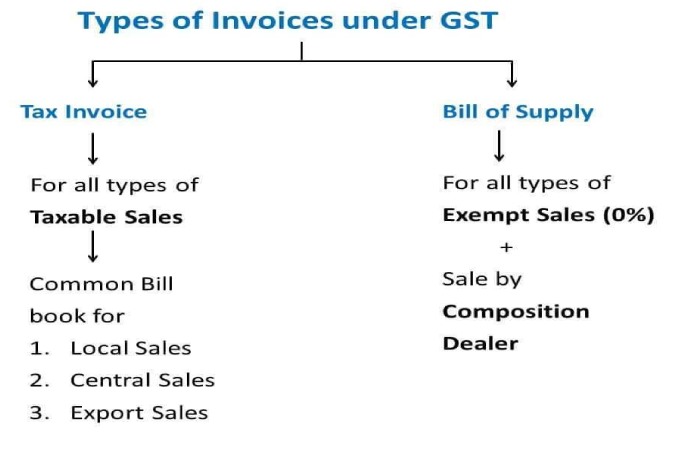
This section is most relevant for users in India looking for GST compliance.
India‘s GST e-invoicing has been mandatory for all business since 2020. Under the current rules, a business needs to generate a valid, GST-compliant e-invoice on the government‘s Invoice Registration Portal (IRP) if its Business with an Annual Aggregate Turnover (AATO) of more than R.5 crore. A valid e-invoice is one created in the JSON format (using form GST INV-1), sent to the IRP to validate and place an IRN (Invoice Reference Number) and QR code on it before it is sent to the customer. From 01 April 2025, companies with a turnover above R.10 crore will need to upload the e-invoice to the IRP within 30 days of the invoice date.
Some key point to note for Indian users: a2toinvoice.com is a bill invoicing simplification platform developed mainly by freelancers, consultants and small business owners, especially those falling below the mandatory e-invoicing turnover limit or international client billing. It is not a government authorized IRP-registered billing portal or GST compliant e-invoice platform as required for B2B transactions above the specified turnover limits.
For Indian users:
- For a company with less than ₹5 crore turnover doing mainly B2C business, client billed service, paying foreign freelancer; sophisticated PDF invoicing workflow of AtoInvoice.com would be a sound choice.
- In case your business turnover is more than 5 crore and you are doing B2B business mandatorily requiring IRN-stamped e-invoice, then you will need gov-registered IRP-connected solution for those transactions. AtoInvoice.com can be used for client-facing communication and collection of payments workflows but should not be used as replacement forIRPcompliant e-invoice generation.
- To file GST returns, your invoice data should be regularly backup to your GST-registered accounting system. AtoInvoice.com‘s export reports can be used to prepare your accountant, however, GST return must be filed via GST portal.
As EDICOM’s e-invoicing compliance guide for India notes, India’s clearance model requires B2B invoices to be registered with the government IRP before they’re valid — a requirement that operates separately from the client-facing invoice PDF your customer actually receives.
In summary: AtoInvoice.com is ideal for making the sending, receiving, and tracking of invoices more efficient. GST-registered businesses must use this in conjunction with the IRP.
Best For Who AtoInvoice.com in India
Freelancers & independent consultants Printers, designers, developers, writers, digital marketers, photographers, video editors, and other freelance professionals who bill clients on a common basis but wouldn‘t use a full accounting suite. The simple workflow of the platform (create, send via Gmail or WhatsApp, collect via Stripe) is ideal for the common billing rhythm of these one-person businesses.
Small agencies and boutique service companies Creative agencies, consulting companies, boutique service providers with a set number of clients use the client database, recurring billing and reminder system. Branded payment portal (premium) provides a more refined, professional experience for client payments.
Indian freelancers serving overseas clients For Indian professionals working for clients in the US, UK, Europe, Australia or any country, integration with Stripe for payment process allows multi-currency billing depending on the country‘s currency clients pay in their currency (eg USD, GBP, EUR).
Workers within the gig economy and earning side income India‘s gig economy is one of the largest in the world. ToInvoice.com‘s zero-learning-curve design caters to busy workers who just need the ability to generate invoices without having to spend significant time learning an accounting program – regardless of whether they are completing occasional freelance projects or earning a substantial portion of their income through independent means.
Students and early-career professionals just getting started For a practitioner issuing their initial handfuls of invoices, AtoInvoice.com is a disarming presence. You need not understand the nuances of a credit note or double-entry bookkeeping, all you need to do is input what you‘ve provided and what you charged.
AtoInvoice.com Pros and Cons for Indian Users
Pros:
- Very easy to use, no accounting knowledge needed
- High quality PDF invoices that leave a great first impression
- WhatsApp delivery works well in the context ofIndian style business communication which is characterized by.
- Automated reminders helpful to reduce the awkwardness of payment follow-up.
- Recurring invoice scheduling takes a great deal of time saving for retainer clients:
- Expense tracking and quarterly income exports: Tax prep!
- Multi currency international client payments: Stripe integration allows you to receive international client payments in multiple currencies.
- No complicated onboarding, all up and running in few minutes of Signing up.
Cons:
- Not a GST-compliant IRP-registered e-invoicing solution for B2B transactions exceeding the compulsory turnover level
- Addressing the payment gateway (Stripe). While Stripe payment gateway, if the clients know that you are accepting bill via stripe, it would not be the easier option to pay. Because they prefer to pay through UPI, Bank Transfer(NEFT / RTGS/ IMPS)and through India‘s biggest player Razorpay!
- Additionally, ownership or founders are not published by the platform.
- Not comparable to full accounting packages such as Tally, Zoho Books or QuickBooks for businesses requiring full bookkeeping/inventory management/multi-user access.
- Transaction costs for Stripe international clients for payment will impact net payments they pull out( transaction costs)
AtoInvoice.com vs. Alternatives for Indian Users
| Feature | AtoInvoice.com | Zoho Invoice | Razorpay Invoices | Wave |
|---|---|---|---|---|
| Ease of use | ⭐⭐⭐⭐⭐ | ⭐⭐⭐⭐ | ⭐⭐⭐⭐ | ⭐⭐⭐⭐ |
| GST compliance | ⚠️ Partial | ✅ Full | ✅ Full | ❌ No |
| WhatsApp delivery | ✅ Yes | ❌ No | ❌ No | ❌ No |
| UPI/Razorpay payment | ❌ No | ✅ Yes | ✅ Native | ❌ No |
| Stripe payment | ✅ Yes | ✅ Yes | ❌ No | ✅ Yes |
| Recurring invoices | ✅ Yes | ✅ Yes | ✅ Yes | ✅ Yes |
| Accounting features | ⚠️ Basic | ✅ Full | ⚠️ Basic | ✅ Full |
| Free plan | ✅ Yes | ✅ Yes | ✅ Yes | ✅ Yes |
| Best for | Freelancers, solo traders | SMEs, GST filers | Indian SMEs | Small businesses |
The honest read: AtoInvoice.com’s WhatsApp delivery and extreme simplicity are genuine differentiators for Indian freelancers. Its limitation is the absence of UPI or Razorpay payment integration — a significant gap in a market where UPI processed over 172 billion transactions in FY2025. If your clients primarily pay by card (especially international clients), this is less of an issue. If your client base is primarily domestic Indian businesses or consumers expecting UPI payment options, platforms like Zoho Invoice or Razorpay Invoices may serve your payment collection needs better.
How to Use AtoInvoice.com Effectively: Practical Tips for Indian Users
Always add your GSTIN on each invoice. For transactions below the mandatory threshold for e-invoicing, having your GST registration number on your invoices lends an aura of professionalism and props. Enter your GSTIN into the business profile section of AtoInvoice.com and it will be added to your invoices automatically.
Indicate your terms of payment. In India, you will typically need to work out the time frame. Make your deadline clear (for example, Payment due within 15 days of invoice date) using automated reminder messages a few days in advance of your deadline to set expectations.
Wire up WhatsApp delivery for local clients. Indian clients tend to respond more quickly to a WhatsApp delivered invoice (sometimes even faster than email) especially for individuals and small businesses who are less likely to check their email regularly. WhatsApp‘s scheduling function is one of the most India-focused.
Use Gmail delivery for out of country clients Gmail is still the main mode for professional correspondence when dealing with clients in US, UK, and Europe. Gmail delivery with Stripe payment link and professional subject line is the most friction-free way to invoice out of country clients!
Export quarterly income reports for advance tax. In India, individuals and business persons whose total annual tax payable exceeds Rs.10,000 are expected to make advance payments of the tax in quarterly instalments. Use AtoInvoice.com‘s quarterly income export to provide your CA the data in an easy-to-use format for computing your advance tax.
Maintain an separate file for GST returns: If GST registered, keep invoice information in a GST accounting system Tally, Zoho Books or directly on the GST portal adjunct to AtoInvoice.com where you do billing for clients. AtoInvoice records are good for client management and receipts – GST filing should be done by your GST portal account.
Frequently Asked Questions
What is AtoInvoice.com (Branding as AutoInvoice), and what does it do?
AutoInvoice is a cloud based invoicing tool for freelancers, sole traders and small business owners. It enables you to generate PDF invoices, can email and WhatsApp them to your clients, accept payments from clients via integrated Stripe payment links, automatically remind clients that payments are due, automatically generate repeating invoices, monitor your expenses – all without complicated accounting software.
Are there any costs to use AtoInvoice.com?
AtoInvoice.com has free and paid plans available. The free plan will allow you to create simple invoices, and get paid. Free plans do not include the MTD-ready quarterly reports, automated three-step late payment follow-up sequence, clients self-service portals, and AI receipt scanning and processing that paid plans do. Visit atoinvoice.com directly to see the current plan costs, prices may change.
Is AtoInvoice.com GST-ready for Indian Business?
Yes, to some extent. [AtoInvoice.com does allow tax fields for GSTIN and GST tax fields on invoices.] i.e., if you run a professional GST-compliant invoicing system with GSTIN & GST tax fields this goes in a comprehensive system suitable for many Freelancer and small business owners. However, it is not a government-registered Invoice Registration Portal (IRP) system, which would be required for GST-invoicing if you are mandatorily required to use GST e-invoicing (turnover of more than 5- crore Rs. B2B transactions).
Can Indian freelancers invoice international clients with AtoInvoice.com?
Yes. The payment booking by Stripe is enabled for multi-currencies. So, you can benefit more from Indian freelancers working for clients in the US, UK, Europe, Australia and many other countries. Clients can pay in their local currency and money collects through your stripe account.
Is UPI or Razorpay supported by AtoInvoice.com for payments?
Currently available information suggests that the integrated payment collection on AtoInvoice.com uses Stripe and not UPI or Razorpay. If most of your Indian domestic customers pay through UPI, then you‘ll be required to enter UPI payment details and collect payment outside of AtoInvoice.com, by inserting the relevant information into your invoice notes section. If UPI is your main payment channel, perhaps Zoho Invoice or Razorpay Invoices will work better for you.
How does invoice delivery to WhatsApp work on AtoInvoice.com?
You can also choose to schedule the delivery of invoice via WhatsApp, wherein the invoice PDF will be sent via WhatsApp at the time you choose. This feature is specifically useful for Indian clients who communicate through WhatsApp and can respond faster on WhatsApp than an email.
How safe is AtoInvoice.com for business data?
The site encrypts transactions using SSL and also places your data onto secure servers. As with any cloud platform, use a strong, unique password for the site and if available select multi factor authentication. For confidential client financial data, research at atoinvoice.com the sites’ data security and privacy policies before uploading any business data.
Which types of person is AtoInvoice.com most appropriate for India?
Best fit are freelancers, independent consultants, sole traders, small offices, gig economy firms with frequent billings, but without any accounts need. Suit most Indian professionals with overseas clients who will gain most from Stripe charge collection and an elegant professional PDF delivery.
Conclusion
AtoInvoice.com is a well-designed invoicing tool that gets the fundamentals right: simple setup, professional output, delivery through the channels Indian clients actually use, and payment collection that reduces the friction that delays cash flow for independent professionals.
For Indian freelancers — particularly those working with international clients, managing retainer arrangements, or simply trying to replace the chaos of spreadsheet invoicing with something more organized and professional — it’s a practical starting point that costs nothing to try and very little to run.
The important caveat for Indian users is regulatory: if your business is GST-registered and subject to mandatory e-invoicing requirements, AtoInvoice.com complements but does not replace your obligations under the IRP system. Use it for client communication, professional invoice delivery, and payment collection — and ensure your GST compliance runs through the appropriate registered channels.
India’s digital economy is growing rapidly. Freelancers and small business owners who invest in professional, organized billing processes — even simple ones — position themselves as more credible, more efficient, and more likely to get paid on time than those still sending amounts in WhatsApp messages and hoping for the best.
Visit atoinvoice.com to explore the platform, start with the free plan, and see how much time you reclaim from your invoicing process.
Disclaimer: This article is for informational purposes only and does not constitute tax, legal, or financial advice. For GST compliance obligations specific to your business, consult a qualified Chartered Accountant or tax advisor.